
Deleting Documents
How to delete documents from a document set
It may happen that you accidentally upload a document or upload a document into a wrong folder. BetterExaminations allows you to remove documents from a workflow folder when they are no longer needed.
Who can delete a document?
You need permission to upload documents in the course.
A document can be deleted only when all of the following are true:
- No reviewers have been assigned to the document set.
- The document is not locked.
- The document has not been approved for printing.
Important: Deleting a document removes it from the workflow folder for everyone. All users will lose access to it, and the action cannot be undone.
How to delete a document
1. Navigate to the relevant document set folder with the unwanted document inside
2. Select the actions dropdown button on a document and select 'Delete document'
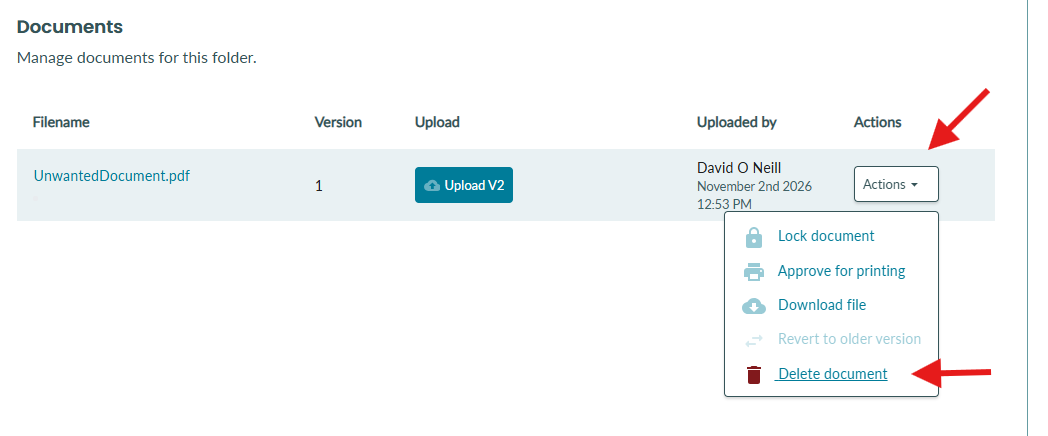
3. You will be asked to confirm that you are happy to delete the document.
NOTE - This action CANNOT be undone.
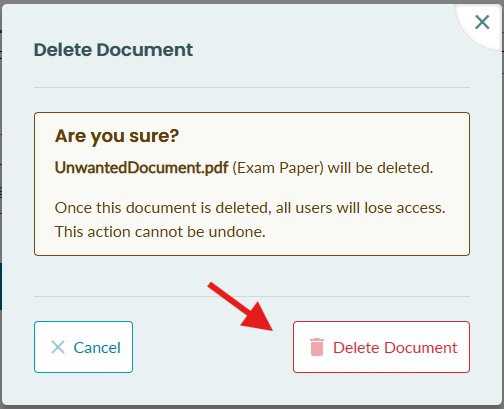
4. The document is now deleted and cannot be recovered.
Why can't I delete a document?
| Situation | What to do |
|---|---|
| Reviewers have already been assigned. | Documents cannot be deleted after reviewers have been assigned to the document set. |
| You do not have permission to delete documents. | Ask a course or organisation administrator to check your workflow-document permissions to confirm they are as expected. |
| The document is locked. | A locked document cannot be deleted. Review the workflow status before continuing. |
| The document has been approved for printing. | Documents approved for printing cannot be deleted. |
If an unexpected error occurs, try again later. If the problem continues, contact your BetterExaminations administrator or support team with the document name and workflow item.