
Document History (Audit Trail)
How to view an audit trail of document events
Having a full audit trail of all document events plays an important role in maintaining a solid workflow process. Our document events feature captures all key activity on a document so you have full traceability from first upload to final approval.
How to view a documents' history (audit trail)
1. To view a documents history, navigate to the document inside the platform.
2. To the right of the document, underneath the document information section, select 'View document history' 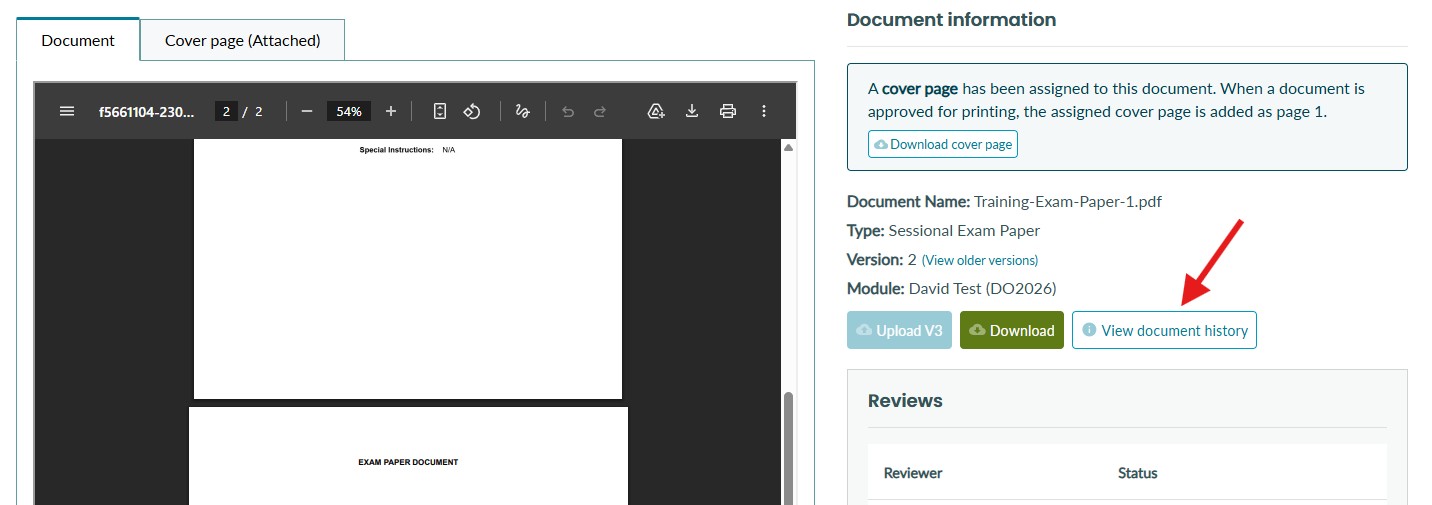
A chronological timeline of every action
Document events are displayed as a visual timeline, ordered from first to last, giving you a clear and easy-to-read history of everything that has happened to a document. Each event shows the name of the user who performed the action and the exact date and time it occurred.
What gets recorded
The following events are automatically captured on every document. Some events may differ/be excluded depending on your organisation's workflow configuration.
-
Uploading a new document or a new version of a document
-
Downloading a document
-
Assigning a cover page to a document
-
Downloading an assigned cover page
-
Sending a document for review and assigning reviewers
-
Removing reviewers from a document
-
Submitting a review - whether approved or changes suggested
-
Approving a document for printing, including cases where approval rules were overridden
-
Marking a document as printed, or undoing that status
-
Generating a document from a template
-
Restoring a document to a previous version
-
Locking or unlocking a document
-
Adding a comment
Comments and attachments
Users can add rich-text comments directly to a document's event timeline. Comments support formatting such as bold, italic, and lists, and can include file attachments. All comments are stored as part of the audit trail, giving reviewers and administrators a permanent record of any notes or feedback raised during the workflow process.
See more about adding comments here
Version awareness
Every event is recorded against a specific version of the document, so you can see exactly which version was uploaded, reviewed, approved, or restored at any point in time.