StringMatch Scoring Method
The stringMatch method compares a value set by authors against a student's response, and evaluates if the two values are the same.
Description
The stringMatch method is used for literal string comparison. This compares the value set by authors in validation against a student's response, and evaluates if the two values are the same. stringMatch is a simple comparison method, and it does not take the syntax and data type that's set in the validation area into account.
Additional Options
- Ignore leading and trailing spaces
Ignores spaces before and after a value, i.e. " a " will be treated as "a". - Treat multiple spaces as one
Multiple spaces will be ignored and treated as one, i.e. "a b" is the same as "a b". - Inverse result
This will invert the response specified in validation. This means that any response will be correct except for the one set by the author.
Examples
Example 1 - Ignore leading and trailing spaces + Treat multiple spaces as one
The student's response should match the exact value set in validation. Ignore leading and trailing spaces and Treat multiple spaces as one are enabled.

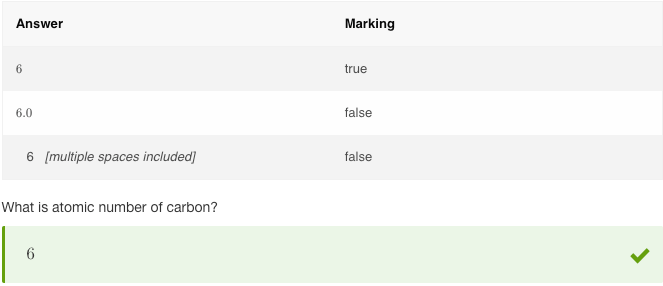
Example 2
In this example, Ignore leading and trailing spaces and Treat multiple spaces as one are disabled. Only "6" will be accepted as correct response.